Video Editing for Brands: Tools, Techniques & Strategy
Video editing for brands is the process of transforming raw footage into polished, on-brand content that drives audience engagement and business results. Done right, it’s the difference between a scroll-past and a share.
Key Takeaways
- for brands requires consistent visual identity across every frame, not just good cuts.
- Choosing the right software depends on your team size, budget, and production volume.
- Basic techniques like color correction and sound design have an outsized impact on perceived brand quality.
- Online editors like Canva and Adobe Express make professional-looking video accessible without a full production team.
- Analytics and iteration are what separate brands that grow through video from those that just post and hope.
Why Video Editing for Brands Actually Matters
this type of brands is not a finishing step. It’s a strategic act that shapes how audiences perceive your company, your values, and your credibility. Raw footage is just raw material. The edit is where the brand lives.
According to Microsoft’s business insights research, over 3 billion internet users stream or download video at least once a month. That’s not a niche audience. That’s the entire internet showing up to watch. The question is whether your brand’s video is worth their time.
Superside, one of the leading creative subscription platforms, puts it plainly: a well-edited video both looks good and performs. The demand for quality video editing services in 2026 stems from the need to balance creativity with speed. Raw footage, no matter how well shot, requires expert editing to align with brand guidelines, captivate viewers, and drive engagement.
“Video content is not optional anymore, no matter your industry. Brands are relying on high-quality video editing to captivate audiences and stand out in crowded markets.” – Superside, 2026 Brand Video Report
Enhancing Brand Visibility
Effective this kind of for brands creates a visual signature that audiences recognize instantly. Consistent color grading, motion style, and pacing train viewers to associate a certain aesthetic with your company. That recognition compounds over time.
Driving Audience Engagement
Well-edited videos earn more shares. According to research cited by Microsoft 365, 51% of survey respondents said they’re more likely to share a video with friends compared to other content types. The edit is what makes a video shareable: tight pacing, clear narrative, and sound that pulls you in.
Building Brand Identity
Consistent editing style is one of the most underrated brand-building tools available. When every video your brand publishes shares the same visual language, fonts, color palette, and tone, you’re not just making content. You’re building a recognizable creative world that audiences want to return to.
Choosing the Right Video Editing Software
The right video editing software for your brand depends on three things: who’s editing, how often, and what the output needs to look like. There’s no single correct answer, but there are clear categories.
Popular Video Editing Tools
- Adobe Premiere Pro: A professional-grade tool widely used across agencies and in-house creative teams. Best for brands with dedicated editors and complex production needs.
- Final Cut Pro: The go-to for Mac-based teams. Fast rendering and a clean timeline make it a favorite for high-volume video production.
- Canva: A genuinely powerful option for marketing teams without dedicated editors. Canva’s online business video maker offers professionally designed templates, drag-and-drop editing, and Brand Kit functionality to keep every video on-brand.
- Adobe Express: Adobe’s free online marketing video maker lets you upload footage, add brand colors and logos, and export platform-ready content in minutes. No experience required.
- InVideo: A versatile online editor with a strong template library, well-suited for social-first brands producing content at volume.
Criteria for Selection
When evaluating tools for video editing for brands, Cenareo’s 2026 business video guide identifies five key criteria worth weighing: accessibility across devices, compatibility with your distribution formats (social, digital signage, intranet), collaborative features for team review and approval, depth of creative features, and integration with your existing tech stack.
Cost Considerations
Budget is real. Free tools like Canva and Adobe Express cover the essentials for most marketing teams. Professional platforms like Adobe Premiere Pro and Final Cut Pro carry subscription or one-time costs, but deliver the control and output quality that brand-level production demands. Match the tool to the output, not to the aspiration.
Pros and Cons of In-House Video Editing for Brands
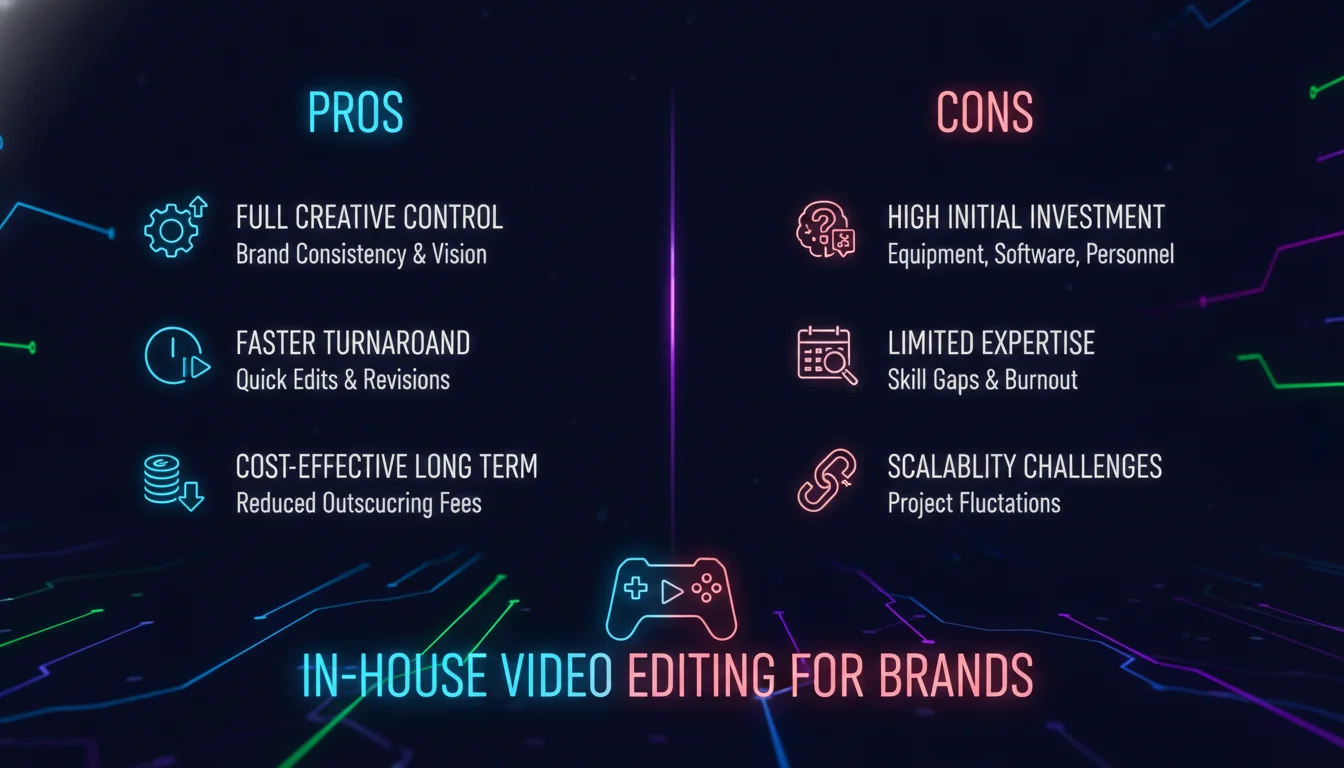
Deciding whether to build internal video editing capacity or outsource it is one of the most consequential creative decisions a brand can make. Here’s how the tradeoffs actually break down.
Pros
- Brand consistency: An in-house editor lives inside your brand world daily. They absorb the voice, the visual style, and the strategic priorities in ways an outside vendor rarely can.
- Speed and agility: Reactive content, trend-driven posts, and last-minute campaign edits are far easier to execute when your editor is on your team.
- Cost efficiency at scale: For brands producing high volumes of video, in-house editing typically costs less per asset than agency or freelance rates over time.
- Institutional knowledge: Your editor accumulates footage libraries, brand assets, and production shortcuts that make every subsequent project faster.
Cons
- Skill ceiling: One editor can’t do everything. Motion graphics, color science, sound design, and narrative editing are distinct disciplines. Expecting one hire to master all of them is unrealistic.
- Capacity limits: A single in-house editor will hit a ceiling on output volume. Campaigns with multiple deliverables across formats and platforms can overwhelm a small team fast.
- Equipment and software costs: Professional editing setups require investment in hardware, software licenses, and storage infrastructure.
- Creative isolation: Without outside perspective, in-house editing can become formulaic. Fresh creative input from external collaborators often produces stronger work.
Video Editing Techniques Every Brand Should Know
Video editing for brands is a craft with a clear technical foundation. Understanding the core techniques separates brands that look professional from those that look like they’re trying.
Basic Editing Techniques
- Cutting: Removing unnecessary footage to create a tight, purposeful narrative. Every second that doesn’t serve the story costs you viewer attention.
- Transitions: Using effects to move between scenes without jarring the viewer. The best transitions are the ones audiences don’t notice.
- Color Correction: Adjusting colors to ensure visual consistency and enhance the mood of your content. This is where raw footage starts to look like a brand.
Advanced Editing Techniques
- Motion Graphics: Animated elements that add energy and visual clarity. Particularly effective for product explainers and data-driven content.
- Sound Design: Music selection, voiceover mixing, and ambient sound work together to create emotional resonance. Audiences feel sound before they consciously register it.
- Text Overlays: On-screen text that reinforces key messages. Essential for social video, where a significant portion of viewers watch without audio.
Adhering to Brand Guidelines
Every edit should run through your brand guidelines before export. That means checking brand colors, approved fonts, logo placement, and tone. Tools like Canva’s Brand Kit make this automatic. For teams using professional software, a brand style guide document pinned to every project folder is non-negotiable.
Online Video Editing Solutions for Brands
Online video editing for brands has matured significantly. What once felt like a compromise now covers the production needs of most marketing teams.
Benefits of Online Video Editors
- Accessibility: Edit from any device with a browser. No installation, no compatibility issues, no waiting for software updates.
- Collaboration: Multiple team members can review, comment, and edit simultaneously. Canva, for example, allows real-time collaborative editing with shareable draft links.
- Cost-Effectiveness: Free tiers on tools like Canva and Adobe Express give brands access to professional templates and editing features without subscription costs.
Top Online Video Editing Tools
- Canva: Offers a free online business video maker with over 1 million professionally designed templates, AI-powered features like Beat Sync and Magic Animate, and Brand Kit integration for Pro users.
- Adobe Express: Adobe’s free online marketing video maker includes drag-and-drop editing, Adobe Stock soundtracks, and one-click brand color and logo application.
- InVideo: A versatile online editor with a strong template library suited for social-first brands producing content at volume.
Limitations of Online Editors
Online tools trade depth for accessibility. Advanced color grading, complex motion graphics, and multi-track audio mixing still require professional desktop software. Brands producing broadcast-quality or high-complexity content will hit the ceiling of online editors quickly. Know your production tier before committing to a tool.
When to Hire a Video Editing Company
Outsourcing video editing for brands makes sense when your internal capacity can’t match your content ambitions. According to Superside’s 2026 analysis, the majority of video marketers acknowledge their companies could do more with video. A dedicated video editing company bridges that gap.
“Hiring a video editing company could lighten the load if you lack in-house capacity or skills. Finding a first-rate video editing company is an eternal nightmare – but the right partner changes everything.” – Superside, April 2026
Superside’s 2026 roundup of top video editing companies includes Kimp, Video Husky, beCreatives, Lightning Video Editors, Edit Crew, and Clipmasters, among others. Each serves different brand sizes and content volumes. Subscription-based models are increasingly popular for brands that need consistent output without the overhead of a full in-house team.
Increditors, a video editing agency focused on brands and creators, reports working with over 340 clients across startups, production houses, and agencies, with more than 1,700 video projects completed and over 300 million video views generated for clients. Those numbers reflect what’s possible when editing is treated as a strategic function, not an afterthought.
Effective Video Editing Strategies for Brand Growth
Strategy is what separates brands that grow through video from those that just produce it. Video editing for brands without a strategic framework is expensive content creation with unpredictable results.
Understanding Your Audience
Every editing decision should trace back to your audience. Pacing, music genre, caption style, video length: all of these are audience variables, not aesthetic preferences. A B2B SaaS brand and a direct-to-consumer fashion label need completely different editing approaches, even if both are posting to Instagram.
Platform-Specific Formatting
Video editing for brands in 2026 means editing for each platform, not just repurposing one cut everywhere. According to Sprout Social data cited by Microsoft, TikTok requires 1080×1920 resolution at a 9:16 aspect ratio. YouTube supports resolutions from 256×144 up to 4096×2304. Each platform has its own file size limits, format requirements, and audience behavior patterns. Your edit should be native to where it lives.
Utilizing Analytics
Video performance data tells you what your instincts can’t. Watch time, drop-off points, click-through rates, and share counts all reveal how your editing choices land with real audiences. Use that data to inform the next edit. The brands that improve fastest are the ones that treat every published video as a learning opportunity.
Testing and Iteration
Run A/B tests on intros. Try different music tracks. Experiment with caption styles. The creative instinct that got you started will only take you so far. Systematic testing of editing variables is what compounds into a genuinely high-performing video strategy over time.
The 80/20 Rule in Video Editing
The 80/20 rule in video editing means that roughly 20% of your editing decisions drive 80% of your video’s impact. Focus your energy on the elements that move the needle most: the opening hook, the pacing of the first 15 seconds, the clarity of your core message, and the quality of your audio. Everything else is polish.
For brands, this principle is especially useful when working with limited time or budget. Rather than perfecting every transition, invest in a strong opening, clean audio, and a clear call to action. Those three elements alone will outperform a technically complex video with a weak narrative structure.
Video Editing for Brands: Platform Format Guide
| Platform | Recommended Resolution | Aspect Ratio | Recommended Format | Max File Size |
|---|---|---|---|---|
| TikTok | 1080×1920 | 9:16 | MP4 or MOV | 72 MB (Android) / 278.6 MB (iOS) |
| YouTube | Up to 4096×2304 | 1:2.4 to 2.4:1 | MP4, MKV, WebM | Varies by account |
| 1080×1920 (Reels) | 9:16 | MP4 or MOV | Platform-dependent |
Source: Sprout Social, via Microsoft 365 Business Insights, 2024
Start Building Smarter Brand Video
Video editing for brands is one of the highest-leverage creative investments you can make. The brands winning on social, in paid media, and across digital channels in 2026 aren’t just producing more video. They’re editing smarter, staying consistent, and using data to get better with every publish.
If you want to explore how Emin Media approaches video production and brand storytelling, check out our creative services and our thinking on brand strategy and content. We work with founders, marketing teams, and creative directors who are serious about building something that lasts.
Ready to build something bold? Contact Emin Media for a free brand consultation and let’s figure out what your video strategy is actually missing.
Frequently Asked Questions
What does the 80/20 rule mean in video editing?
The 80/20 rule in video editing means that roughly 20% of your editing choices create 80% of your video’s impact. For brands, that usually means prioritizing a strong hook, clean audio, and a clear message over technical complexity. Focus your time where it moves the needle most.
How do you make a video for a brand?
Start by defining the message and the audience, then choose editing software that matches your team’s skill level and production volume. Use your brand guidelines to govern color, typography, and tone throughout the edit, and optimize the final cut for the specific platform where it will live.
What is the 3:2:1 rule in video editing?
The 3:2:1 rule is a data backup standard: keep three copies of your video files, stored on two different media types, with one copy stored off-site or in the cloud. For brands producing ongoing video content, this protects against losing raw footage, project files, and final exports.
How much does a 1-minute brand video edit cost?
Pricing for a 1-minute video edit varies widely based on complexity, turnaround time, and the editor’s experience level. Increditors, a specialist brand video agency, lists social media editing packages starting from $2,500 per month for ongoing content. Freelance rates for a single 1-minute edit typically range from $50 to $500 depending on scope.
What are the best free video editing tools for brands?
Canva and Adobe Express are the strongest free options for most brand marketing teams. Canva offers over 1 million templates, real-time collaboration, and Brand Kit integration. Adobe Express provides drag-and-drop editing with Adobe Stock soundtracks and one-click brand color application. Both export platform-ready formats without requiring any software installation.
Enjoyed this article?
Contact Emin Media for a free brand consultation and let's create something amazing together.
Get in TouchRelated Articles
Digital Storytelling for Brands: The Complete Guide
Digital storytelling for brands builds real audience connections through narrative. Learn proven techniques, formats, and…
Design Thinking for Marketing: A 2026 Guide
Design thinking for marketing builds campaigns around real user needs. Learn the 5 phases, common…
Creative Direction for Video Shoots: A Complete Guide
Master creative direction for video shoots with proven steps, tools, and strategies that build brand…