Social Media Content Calendar: The 2026 Guide
Key Takeaways
- A social media content calendar is a structured schedule of all social posts, aligning content with business goals and audience preferences.
- Building one can cut down content creation scrambling, improve team collaboration, and boost post engagement over time.
- CoSchedule, Sprout Social, and Notion sit among the top platforms, with Notion offering over 800 customizable templates.
- As of 2026, AI-powered tools like CoSchedule’s Hire Mia streamline copywriting and scheduling, making sophisticated planning accessible to lean teams.
- Grab a free template from Sprout Social or use Adobe Express’s free scheduler to get moving today.
A social media content calendar is a forward-looking schedule of every post across your networks, organized by date, platform, and creative asset. It turns chaotic posting into a real strategy.
What Is a Social Media Content Calendar?
Definition and Core Purpose
A content calendar is a forward-looking plan of all scheduled posts across your social platforms, organized by publish date, time, and network, according to Sprout Social’s Jamia Kenan. It works as a central document, whether that’s a spreadsheet, a digital planner, or a dedicated tool, detailing every piece of a post: copy, visuals, links, tags, and platform. Think of it as your brand’s mood board and traffic controller in one place. Whether you’re a solo founder posting from your phone or running a five-person creative team, this document keeps your voice consistent.
“A this type of calendar captures every element of a post, ensuring your team publishes with precision and consistency,” says Jamia Kenan, social media strategist at Sprout Social. “It’s not just a schedule. It’s the backbone of a strategic social presence.”
How It Differs from a General Content Calendar
A general content calendar maps every piece of marketing collateral, blogs, email newsletters, podcasts, while a this kind of content calendar zooms in on social platforms exclusively. It handles the specific demands of real-time engagement, character limits, visual formats, and platform algorithms. Separating social from your broader content plan lets you tailor tone for each audience, from LinkedIn’s professional crowd to TikTok’s trend-chasing scroll.
The Evolution of Social Media Planning in 2026
Planning has shifted from static scheduling to dynamic, data-informed workflows as algorithms mature and AI becomes standard equipment. Tools now bake in AI-assisted caption writing, performance prediction, and real-time trend monitoring. CoSchedule’s Hire Mia acts as a collaborative AI editor that drafts posts alongside you, while Sprout Social recommends optimal send times based on actual audience behavior. Staying sharp this year means choosing a calendar that keeps pace with these shifts, not one frozen in 2022 habits.
Why Your Brand Needs a Social Media Content Calendar
Ensures Consistency and Strengthens Brand Voice
Inconsistent posting is one of the fastest ways to lose an audience’s trust. A content calendar enforces a reliable cadence so your followers get on-brand messaging instead of sporadic noise. Pre-planning campaigns and seasonal moments around a cohesive visual identity, think consistent color palettes, recurring caption formats, signature emoji use, builds recognition the way a strong logo does. This is brand storytelling in motion, not just a posting schedule.
Saves Time and Reduces Last-Minute Scrambles
Batch-creating and scheduling content ahead of time takes the daily fire drill out of social media. With a calendar, you block specific time for ideation, approvals, and publishing instead of hunting for a caption at 4:45pm on a Friday. Adobe Express even offers a free scheduler where you can drag and drop posts, preview your feed, and schedule across TikTok, Instagram, and Facebook from a single dashboard.
Aligns Team Efforts and Client Expectations
For agencies and in-house teams, a shared calendar creates transparency that emails and Slack threads never will. Stakeholders review upcoming content, drop feedback, and approve posts before anything goes live. This collaborative model, one CoSchedule leans into with its Agency Calendar for multi-client management, cuts down on miscommunication and keeps everyone rowing in the same direction.
Key Components of an Effective Social Media Content Calendar
Content Types and Formats
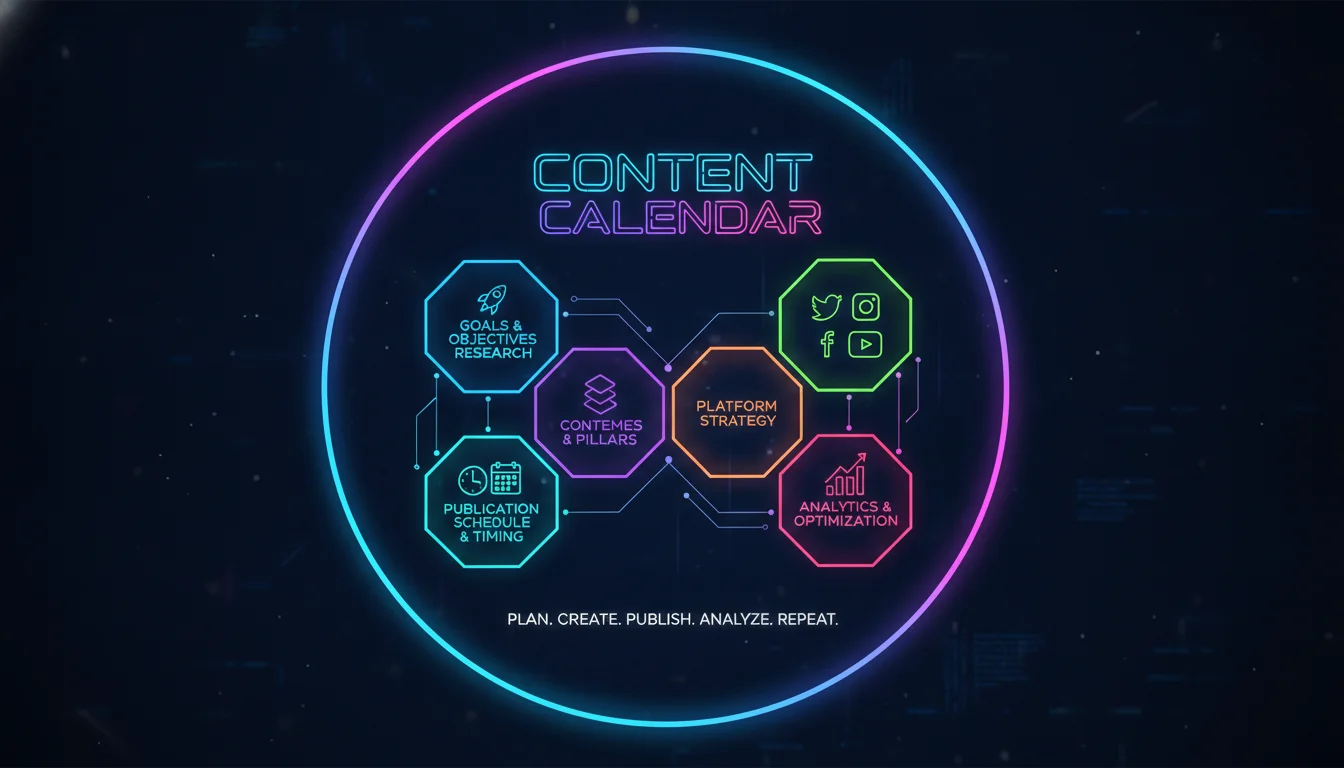
A strong the media content calendar plans for a mix of formats: images, videos, Stories, Reels, carousels, polls, and link posts. Balancing educational, promotional, user-generated, and conversational content keeps a feed from feeling like an ad wall. Try assigning themes by day, industry insights on Monday, behind-the-scenes on Thursday, community reposts on Friday, so your team never faces a blank page.
Scheduling: Timing, Frequency, and Time Zones
Timing and frequency directly affect how many people see your posts. The ideal posting cadence varies by platform and audience, but a calendar lets you test and track what actually moves the needle for your specific followers. Schedulers like Sprout Social surface analytics showing peak engagement windows and let you queue posts across time zones automatically.
Performance Tracking and KPIs
The strongest calendars close the loop between planning and measurement by connecting directly to analytics dashboards. Track reach, engagement rate, click-throughs, and conversions for every post you publish. Reviewing this data regularly lets you refine your approach and prove, in hard numbers, that your calendar is driving business results and not just filling a feed.
Types of Social Media Content Calendars
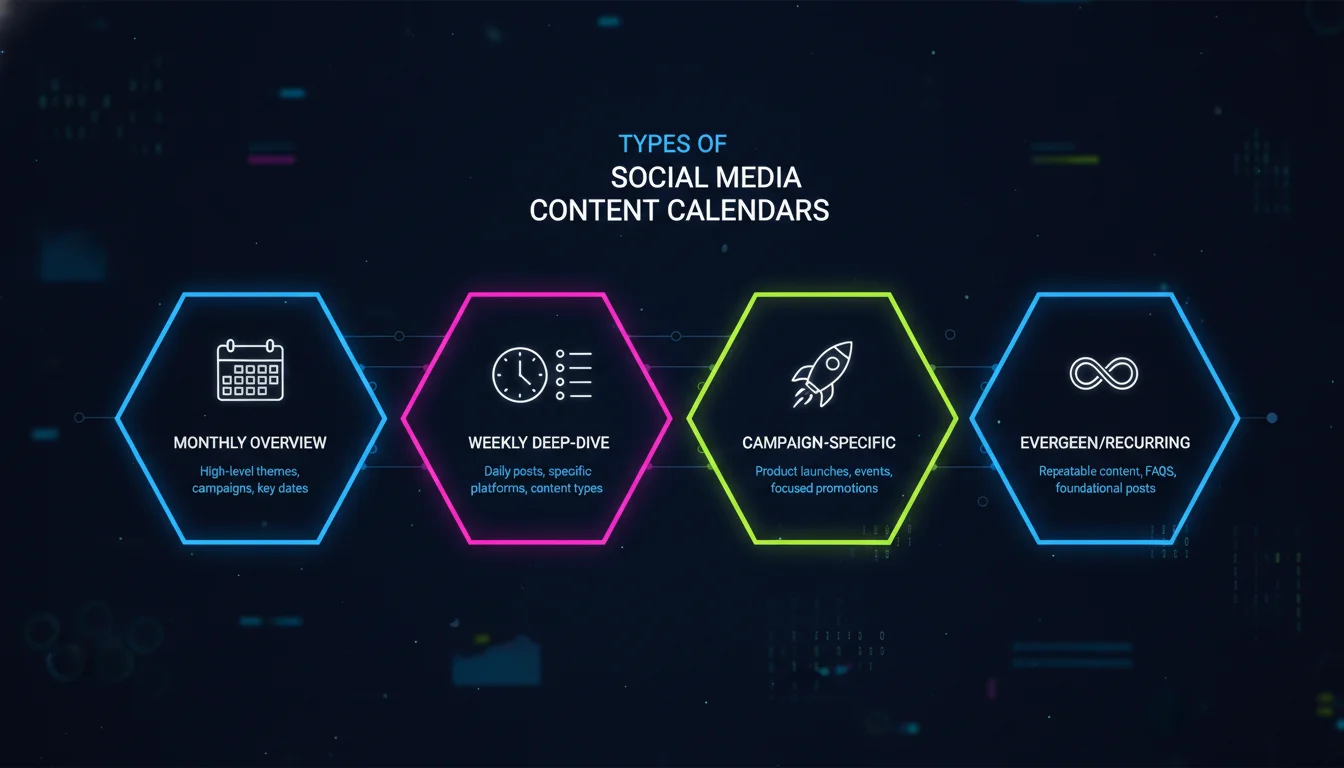
There are three main ways to build a content calendar, and each comes with real tradeoffs worth weighing before you commit.
Spreadsheets (Google Sheets, Excel)
A spreadsheet-based calendar is the fastest, cheapest way to get organized. Download a free template from Sprout Social or build your own in Google Sheets for full control over columns and formulas. Teams can collaborate live, and simple formulas can automate date tracking and status updates. The tradeoff: spreadsheets demand manual upkeep and can’t publish directly to your platforms.
Visual Planning Tools (Notion, Trello, Asana)
Teams that think in boards and visuals lean toward Notion or Trello, which offer Kanban views, calendars, and linked databases. Notion’s library of over 800 content calendar templates makes setup nearly instant, ranging from Instagram-specific planners to full multi-client agency operating systems. Notion has also leaned into AI-assisted databases, letting teams auto-tag content, summarize campaign notes, and surface ideas without manual sorting. These platforms handle rich media, tags, and checklists beautifully, but none of them publish natively to social networks.
Dedicated Social Media Schedulers (CoSchedule, Sprout Social, Adobe Express)
A dedicated scheduler manages the entire workflow end to end. CoSchedule’s Social Calendar lets solopreneurs and small teams schedule posts, respond to comments, and track impact from one screen, and the platform reports it’s trusted by more than 100,000 marketers. Adobe Express offers a free, intuitive scheduler for individual creators, while Sprout Social caters to enterprise teams with social listening and deep reporting layered on top.
| Calendar Type | Example Tools | Best For | Pros | Cons |
|---|---|---|---|---|
| Spreadsheets | Google Sheets, Excel | Freelancers, small teams on a budget | Free, highly customizable, easy to share | No auto-publishing, manual data entry |
| Visual Planning Tools | Notion, Trello, Asana | Creative teams, project-based workflows | Flexible views, integration with other docs | Cannot publish directly to social networks |
| Dedicated Schedulers | CoSchedule, Sprout Social, Adobe Express | Marketers who need publishing + analytics | End-to-end management, AI features, robust analytics | Often requires paid subscription for full features |
Build a Social Media Content Calendar in 6 Steps
The Step-by-Step Process
Follow this six-step approach to build a calendar tailored to your brand, no expensive software required to start.
- Audit your existing social presence: Review current profiles, note which content earned the most engagement, and flag where gaps or missed opportunities exist across each platform.
- Define clear goals and identify your audience: Set SMART goals (say, increasing Instagram engagement by a meaningful margin this quarter) and sketch audience personas to guide your themes.
- Select your platforms and content mix: Choose two to five networks that match where your audience actually spends time. Decide on a ratio, like 60% educational, 30% promotional, 10% fun or user-generated.
- Choose your calendar format: Pick a spreadsheet, a Notion board, or a dedicated scheduler. If you’re starting fresh, grab a free template from Sprout Social or Adobe Express.
- Populate the calendar with posts: Brainstorm themes, draft captions, and source visuals at least one month ahead. Mark key dates, holidays, and campaign launches so your calendar becomes a single source of truth.
- Schedule, review, and adjust: Publish through your chosen tool and set a weekly check-in to review analytics and swap out anything underperforming. Treat your calendar as a living document, not a museum piece.
Top Tools and Software for Social Media Content Calendars
The right tech stack shapes your entire workflow. Here’s how the leading options stack up for 2026.
| Tool | Best For | Standout Feature | Pricing Model | Free Plan Available? |
|---|---|---|---|---|
| CoSchedule Social Calendar | Solopreneurs & small teams | All-in-one calendar with ReQueue (auto-repost evergreen content) | Paid subscriptions; 14-day trial | No |
| Sprout Social | Mid-market & enterprise | Unified smart inbox + social listening | Paid subscriptions; 30-day free trial | No |
| Notion | Creative teams & agencies | 800+ template library with total flexibility | Free; paid tiers for advanced features | Yes |
| Canva Pro | Design-focused marketers | Built-in design & scheduling suite for non-designers | Paid subscription; 30-day free trial | No |
| Adobe Express | Beginners & creators | Free scheduler with TikTok and multi-platform support | Free plan; paid tiers for premium features | Yes |
How to Select the Right Tool for Your Team Size and Budget
Map your must-have features first: multi-client support like CoSchedule’s Agency Calendar, deep analytics, or just simple scheduling. Small teams often do fine with Adobe Express’s free plan, while larger organizations lean on Sprout Social’s fuller suite. Canva Pro is worth a look if your team is design-heavy but light on dedicated designers, since it packages professional layout tools alongside scheduling. Notion makes sense if you already run projects there and want everything centralized in one workspace.
Social Media Content Calendar Best Practices for 2026
Leverage AI for Content Creation and Scheduling
AI isn’t a novelty feature anymore, it’s baked into how top brands plan. CoSchedule’s Hire Mia and Sprout Social’s optimal send-time feature use machine learning to draft on-brand copy and flag when your audience is most active. Some platforms are also rolling out headline optimization tools, similar in spirit to CoSchedule’s Headline Studio, to test which captions and hooks perform best before you ever hit publish. Use these tools to personalize at scale and auto-repost content that keeps performing.
Balance Evergreen and Real-Time Content
A calendar that’s too rigid kills engagement fast. Evergreen posts, how-tos, FAQs, brand story content, form a reliable foundation, but you need room for trending topics and real conversations. Many teams now build a flexible “trending” slot into their social media specifically for real-time reactions, industry news, or a viral moment worth jumping on.
Integrate User-Generated Content and Community Engagement
User-generated content builds trust faster than almost anything a brand can produce alone, and it lightens your creative workload. Schedule regular prompts asking followers to share photos, reviews, or testimonials, then feature the best ones. A well-built calendar dedicates a column specifically to UGC sourcing and reposting so you never let a great community moment slip by unused.
Pros and Cons
Pros
- Creates consistency across platforms, strengthening brand recognition over time
- Saves significant planning time by replacing daily scrambling with batch creation
- Improves team alignment through shared visibility and streamlined approvals
- Makes performance tracking and ROI attribution far easier
Cons
- Requires upfront time investment to build out themes, personas, and workflows
- Dedicated scheduling tools often carry a paid subscription cost
- Can feel rigid if teams don’t leave room for real-time or trending content
- Visual planning tools like Notion or Trello still can’t publish directly to social platforms
Free Social Media Content Calendar Templates
Ready to start? Grab one of these free resources, each built for different preferences and tools.
Google Sheets and Excel Templates
Sprout Social and HubSpot both offer free downloadable spreadsheets with columns for date, platform, copy, visual link, and status. These work well for beginners who want a straightforward, no-cost entry point before investing in software.
Notion and Trello Boards
If a visual, database-driven approach fits your team better, search Notion’s content calendar template gallery for “Instagram Planner” or “SMM Content Planner.” Thousands of community-built boards are available with pre-built views, automations, and even client-facing dashboards.
Printable and Digital PDF Planners
Some marketers still love a physical planner. Printable PDF templates from Etsy or creative resource sites let you sketch out ideas by hand, a refreshing tactile step before transferring the final plan into a digital scheduler. Worcester State University and similar academic institutions also publish free training resources on building content calendars, useful if you’re onboarding a new team member from scratch.
“The best content calendar isn’t the fanciest tool, it’s the one your team will actually update every week,” is a sentiment echoed across creative industry data on content operations. Consistency in the system matters more than the sophistication of the software.
Frequently Asked Questions
What should a social media content calendar include?
A this type of calendar should include publish dates, platform names, post copy, visual assets or links, mentions, hashtags, and status columns like draft, scheduled, or published. Advanced calendars also track KPIs like reach and engagement rate.
What is the best social media content scheduler?
The best scheduler depends on your needs. CoSchedule excels at unified social and content marketing, Sprout Social offers deeper analytics for larger teams, and Adobe Express provides a genuinely useful free option for creators just starting out.
What are the best free social media content calendars?
Adobe Express’s scheduler is completely free and supports multiple platforms including TikTok. Notion also offers a free tier with access to hundreds of templates, and Canva Pro’s 30-day trial gives temporary access to its content planner.
What is the best platform for a content calendar?
For a dedicated, all-in-one solution, CoSchedule and Sprout Social are strong picks. If you want flexible, template-based customization, Notion is hard to beat, and for ease plus zero cost, Adobe Express’s free scheduler wins.
How often should I update my social media content calendar?
Review your calendar weekly to tweak upcoming posts based on real-time performance. Save bigger overhauls for monthly or quarterly planning sessions tied to campaign themes, and always leave space for spontaneous, trending posts.
Can a social media content calendar improve ROI?
Yes. Planning strategically lets you tie specific posts to specific goals and track conversions from there. A this kind of content calendar means you’re not posting randomly, which makes it far easier to attribute traffic, leads, or sales to a specific campaign.
Ready to stop guessing and start planning with intention? Contact Emin Media for a free brand consultation, and let’s build a content calendar that actually reflects your brand’s voice. Let’s build something bold.
Enjoyed this article?
Contact Emin Media for a free brand consultation and let's create something amazing together.
Get in Touch